aldine.

Open source · Self-hosted · AGPL

Write LaTeX together.
Fast, versioned, yours.

Aldine is an open-source, self-hosted Overleaf alternative: a collaborative LaTeX editor with live co-editing, real git branches and Zotero built in. Two containers, nothing to babysit.

On Writing LaTeX Together

You · your co-authors · the advisor who hates installing TeX

Abstract

Aldine is a slim, open-source platform for collaborative LaTeX: multi-cursor editing where every keystroke arrives live, projects that are real git repositories with branches you can merge from the UI, review comments with one-click suggested edits, and a Zotero panel that cites from your own library. Compiles run in a sandboxed TeX Live container (no network egress, restricted shell-escape), and warm recompiles land in about two seconds. Deployment is two containers and flat files; the license is AGPL, so whoever hosts it after you gets the same source you did.

1

No account, no install. The demo is a shared sandbox and resets every night.


Aldine in action

Aldine in action: A collaborator types, the PDF recompiles, and a double-click on the page jumps the editor to the source line.

Claude as a collaborator

Claude, connected over MCP, tightens the abstract, adds a section, typesets, and shows the PDF. Every edit lands as a commit you can review or revert.

Writes into the live document

Edits arrive in the open editor as an attributed collaborator, with a violet presence chip, and your cursor stays where it was.

Typesets and shows the PDF

Claude runs the compile, reads the errors back with file and line, and shows the PDF in the chat on claude.ai, Claude Desktop and Cowork (a signed link elsewhere). It is the same run your preview adopts.

Every edit a reviewable commit

Each change is a git commit authored “Claude”, marked in History; when the session ends, one prompt opens the diff and can revert it all.

Optional, off by default (ALDINE_MCP=1). The endpoint is plain MCP: claude.ai, Claude Desktop, Cowork, Claude Code and any other MCP client get the tools; the PDF renders inline where the host supports MCP Apps. Setup guide · Try it on the demo instance

Features

Real-time collaboration

CRDT-based (Yjs): multi-cursor, live presence, conflict-free by construction. Unlimited collaborators.

Git-native branches

Every project is a real git repository. Branch, merge, and inspect history from the UI, or publish the project and keep using VS Code. How this differs from git with Overleaf.

Citations, solved

Zotero library sync, paper search by title (OpenAlex), or paste a DOI: BibTeX appended and \cite inserted in one click. Zotero with LaTeX, three ways.

Review mode

Anchored comment threads on text selections, with suggested replacements the author accepts in one click.

Sandboxed compiles

TeX Live in a no-egress container: dropped capabilities, restricted shell-escape, ~2s warm recompiles. pgfplots, biblatex and the journal classes out of the box; any package in one tlmgr install line, all of CTAN one flag away. Self-hosting with Docker Compose.

GitHub, GitLab, Gitea and Forgejo sync

Import a repository or publish a project to a new one, push and pull, and open a pull or merge request from the editor. Works with GitHub, GitLab (gitlab.com or self-hosted), Gitea and Forgejo, Codeberg included.

Bring your Overleaf projects

Download any Overleaf project as a ZIP and drop it on the home screen: root file detected, first typeset automatic.

Made for real papers

SyncTeX both ways, whole-document word count, plain-English compile errors that jump to the offending line, one-click PDF download. Optional AI error diagnosis with your own key, or leave it 100% AI-free.

Your files stay yours

Projects are plain .tex files in plain git repos on your disk, readable without Aldine running, and yours to take anywhere. AGPL-3.0, self-hosted, nothing phones home. Flat files by default; Postgres is the optional datastore.

Sign-in with your identity provider

Off by default for single use. Turn it on for email and password, Google, GitHub, ORCID, or your own OpenID Connect provider: Keycloak, Authentik, Authelia, Pocket ID. OIDC setup.

Claude as a collaborator

Connect your instance to Claude over MCP: Claude writes into the live document, typesets, and shows the PDF in the chat on claude.ai, Claude Desktop and Cowork (a signed link in Claude Code and other MCP clients). Every edit is a commit authored “Claude”, with a review-and-revert prompt. Optional, off by default. See it in action or read how the LaTeX MCP server works.
Aldine compared with Overleaf Community Edition

Overleaf Community Edition is good software, and it is open source too. Overleaf's own comparison of Server Pro and Community Edition lists commenting, real-time track changes, git integration and single sign-on as Server Pro features that Community Edition does not include, and its software requirements show it running next to MongoDB and Redis (both as of October 2026). In Aldine, review comments with suggested edits, git and Zotero are included at no cost (there is no paid tier), and the whole thing is two containers.

Where Overleaf is the better choice: it dates from 2011 and hosts a public template gallery (both as of October 2026), and Server Pro has real-time track changes (as of October 2026). Aldine is young (v0.x) and has review comments with suggested edits, not keystroke-level tracking. The full table, with its sources, is on self-hosting Overleaf (Community Edition, Server Pro) compared with Aldine. For more options, see Overleaf alternatives you can self-host.

Visual editing, done right(experimental)

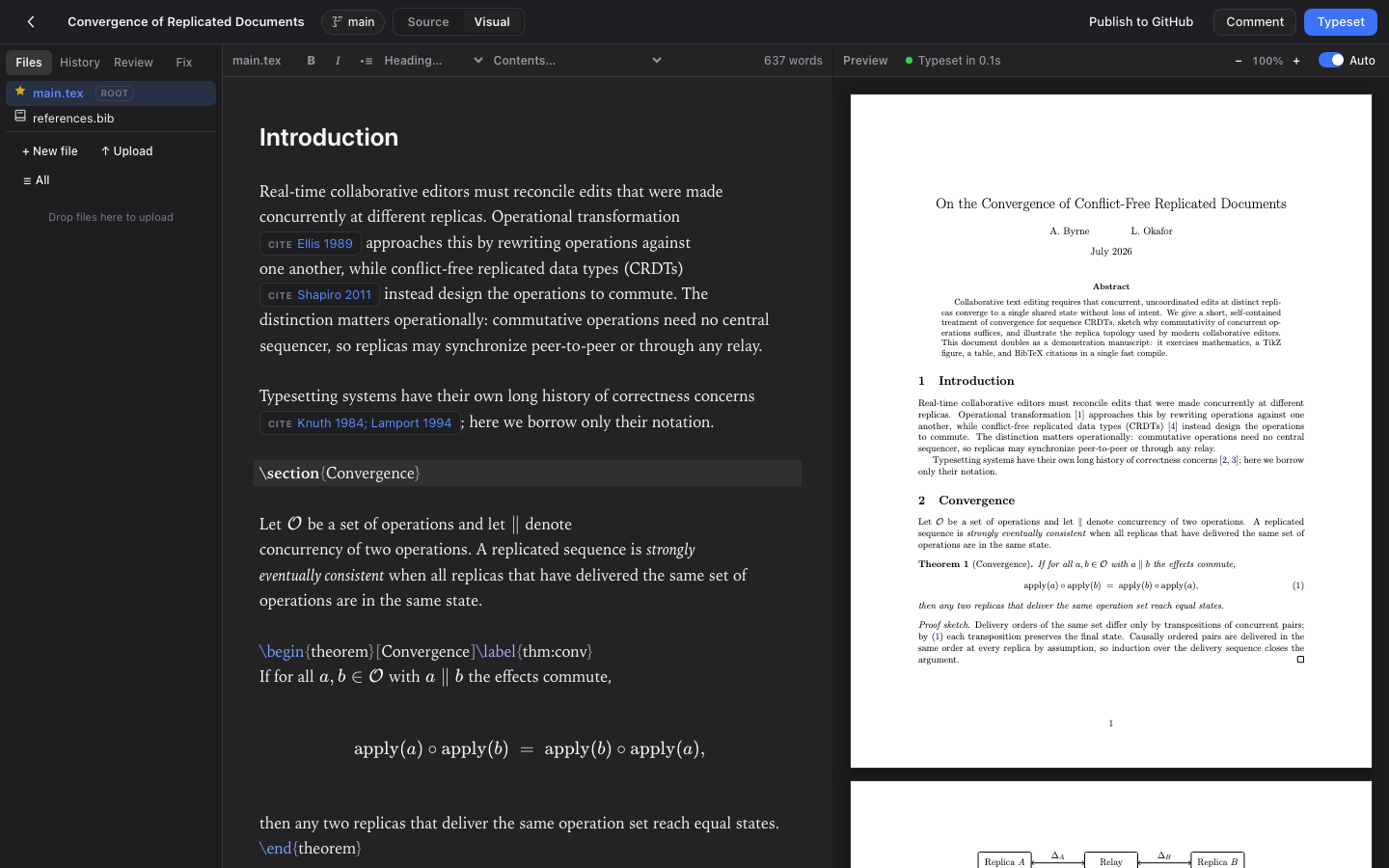
Aldine's visual mode is a rendering layer over the same LaTeX source. The source stays authoritative and byte-stable: it never changes a byte you didn't deliberately edit. What it renders and edits in place:

Aldine’s visual editing mode: the paper rendered as formatted text with typeset math, next to the live PDF

WYSIWYG math

Click an equation to edit it in a real math editor; your changes write back as precise LaTeX.

Editable tables

Tables render as a grid. Edit cells, add rows and columns; each change is an exact source edit.

Suggestions shown inline

Review suggestions show inline as strikethrough + proposed text, accepted or dismissed in place.

Paste to LaTeX

Paste rich text from Word or Docs and it converts to clean LaTeX on the way in.

Live & collab-safe

The construct under your caret (or a co-author’s) reveals its source; everything else stays rendered.

One keystroke away

Toggle Source / Visual instantly, no reload. Off by default; enable it from the command palette.

Quick start

Auth off by default for single use; one env var turns on logins, SSO, and sharing. Storage is flat files by default, with Postgres as the optional datastore. Full guide: self-hosting Aldine with Docker Compose

Common questions

Is there an open-source alternative to Overleaf I can host myself?

Yes. Aldine is an open-source (AGPL-3.0) collaborative LaTeX editor that you run on your own server as two Docker containers. Overleaf also publishes its own Community Edition; self-hosting Overleaf (Community Edition, Server Pro) compared with Aldine has the details.

Does it work with git and GitHub or GitLab?

Every Aldine project is a real git repository with branches you create and merge from the UI. You can push and pull to GitHub, GitLab, Gitea or Forgejo and open a pull or merge request from the editor, and a co-author can clone the repository and keep using VS Code. See git with Overleaf and a git-native alternative.

Is it free, and how many collaborators can a project have?

Aldine is free to self-host under AGPL-3.0, and the number of collaborators is not limited. There is no paid plan and no hosted service today. The self-hosting guide lists what it needs to run.

Can I import my Overleaf projects?

Yes. Download the project from Overleaf as a ZIP and drop it on the Aldine home screen. The root file is detected and the first typeset runs automatically.

Does it have track changes?

Not at keystroke level. Aldine has review comments with suggested edits: select text, leave a threaded comment and optionally attach a replacement that the author accepts with one click.

Does it support single sign-on?

Yes. With AUTH_ENABLED=1, people sign in with Google, GitHub, ORCID or your own OpenID Connect provider (Keycloak, Authentik, Authelia, Pocket ID), or with email and password. ALDINE_SSO_ONLY=1 disables passwords. Setup is in the OIDC guide.